
Bring TikTok DMs and comments into Captivation Hub — and let workflows answer for you. The TikTok DM & Comment Automations feature connects your TikTok account so every message is visible in your Conversations inbox and can trigger automated responses.
What are TikTok DM & Comment Automations?
TikTok DM & Comment Automations connects your TikTok account to Captivation Hub so that:
- Direct Messages (DMs) and post comments appear inside the Conversations Inbox in real time.
- Workflows can be triggered by those incoming messages to send interactive replies, assign leads, create opportunities, and more.
- Every touchpoint is stored on the contact record, giving you a complete conversation history across all channels.
Key Benefits of TikTok DM & Comment Automations
- Unified Inbox: Manage TikTok conversations alongside SMS, Email, WhatsApp, and more in Captivation Hub Conversations.
- Faster Response Times: Use workflows to send instant, 24/7 answers that keep prospects engaged.
- Automation-Driven Efficiency: Use triggers and actions to auto-reply, route leads, and hand off to agents without manual effort.
- Conversion Focus: Turn TikTok engagement into CRM contacts and nurture sequences you can track and report on.
- Scale for Teams: Ideal for agencies and multi-location brands handling high message volumes with shared inboxes and workflows.
Integrating your TikTok Account
Before proceeding, make sure your TikTok accounts are integrated with your Sub-Account. From your Sub-Account dashboard, go to Settings > Integrations > TikTok.
Conversations Inbox for TikTok
Incoming DMs and comments sync to the inbox just like any other channel, making it easy to:
- See profile photos, usernames, and message history in one thread.
- Reply manually with text, emojis, media, or saved snippets.
- Use quick-action buttons to add notes, tags, or tasks.
Components of TikTok Automation
Triggers
- TikTok Comment on a Reel: Workflow starts when there is a new comment on your TikTok post.
- Customer Replied: Select a reply channel like TikTok messenger.
Actions
- Reply In Comments: Reply to a comment with a comment under it.
- TikTok Interactive Messenger: Automate replies or nurture sequences.
TikTok DM Automation
Automate conversational follow-ups when someone sends you a private message.
- The "Customer Replied" trigger paired with the "Reply Channel = TikTok" filter ensures the workflow only fires for TikTok DMs.
- Use the TikTok Interactive Messages action to send rich-button replies similar to WhatsApp Interactive Messages.
TikTok Comment Automation
Turn comment sections into lead magnets by:
- Triggering "TikTok Comment(s) on a Reel" for any or specific posts.
- Using the "Reply in Comments" action to answer publicly, like the comment, or tag the user.
- Following up with a DM or assigning the contact to a rep.
How to Setup Trigger: TikTok Comment(s) on Reel
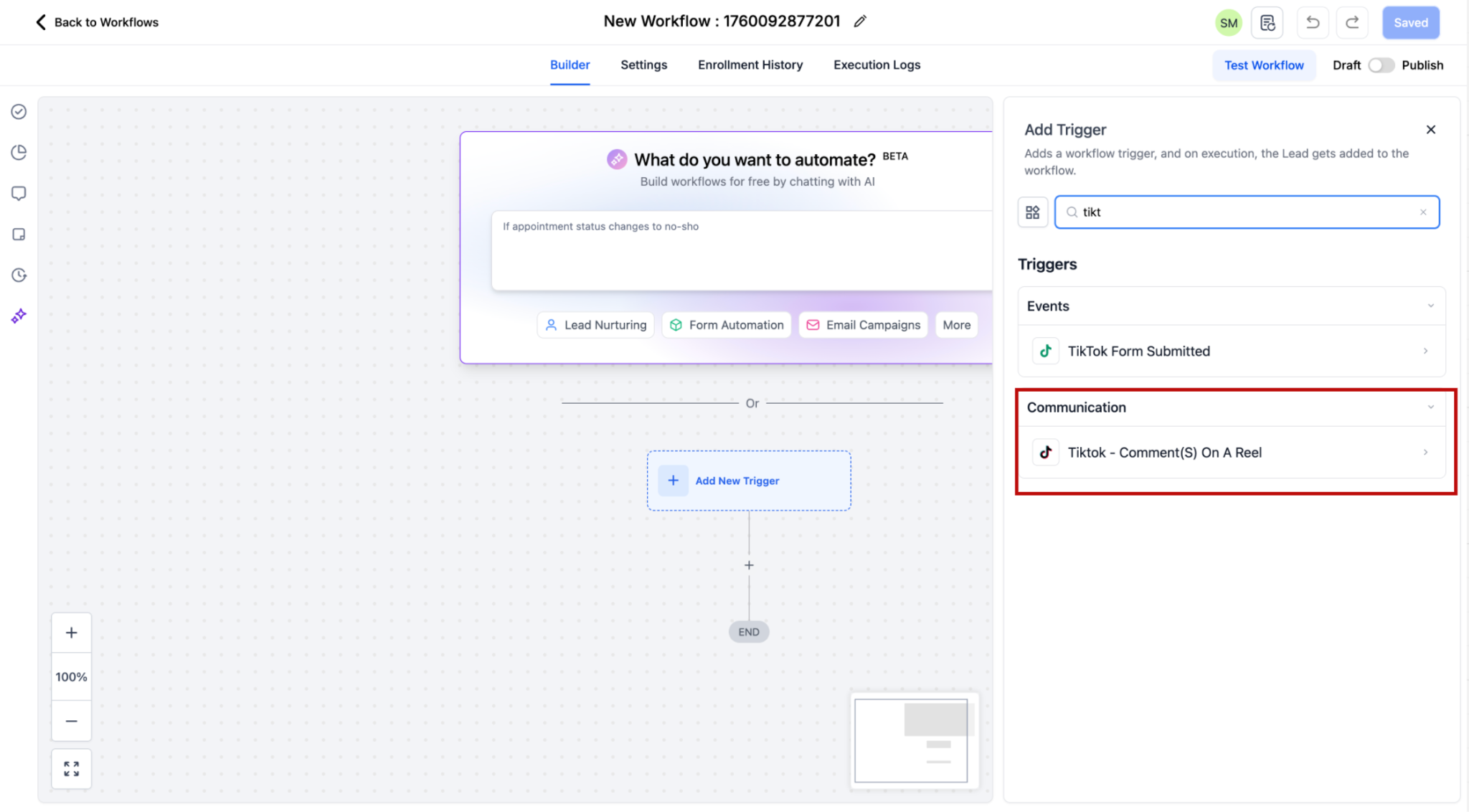
Step 1: Add Trigger
Within the Workflow builder, click + Add New Trigger. Select the trigger TikTok - Comment(s) on a Post.
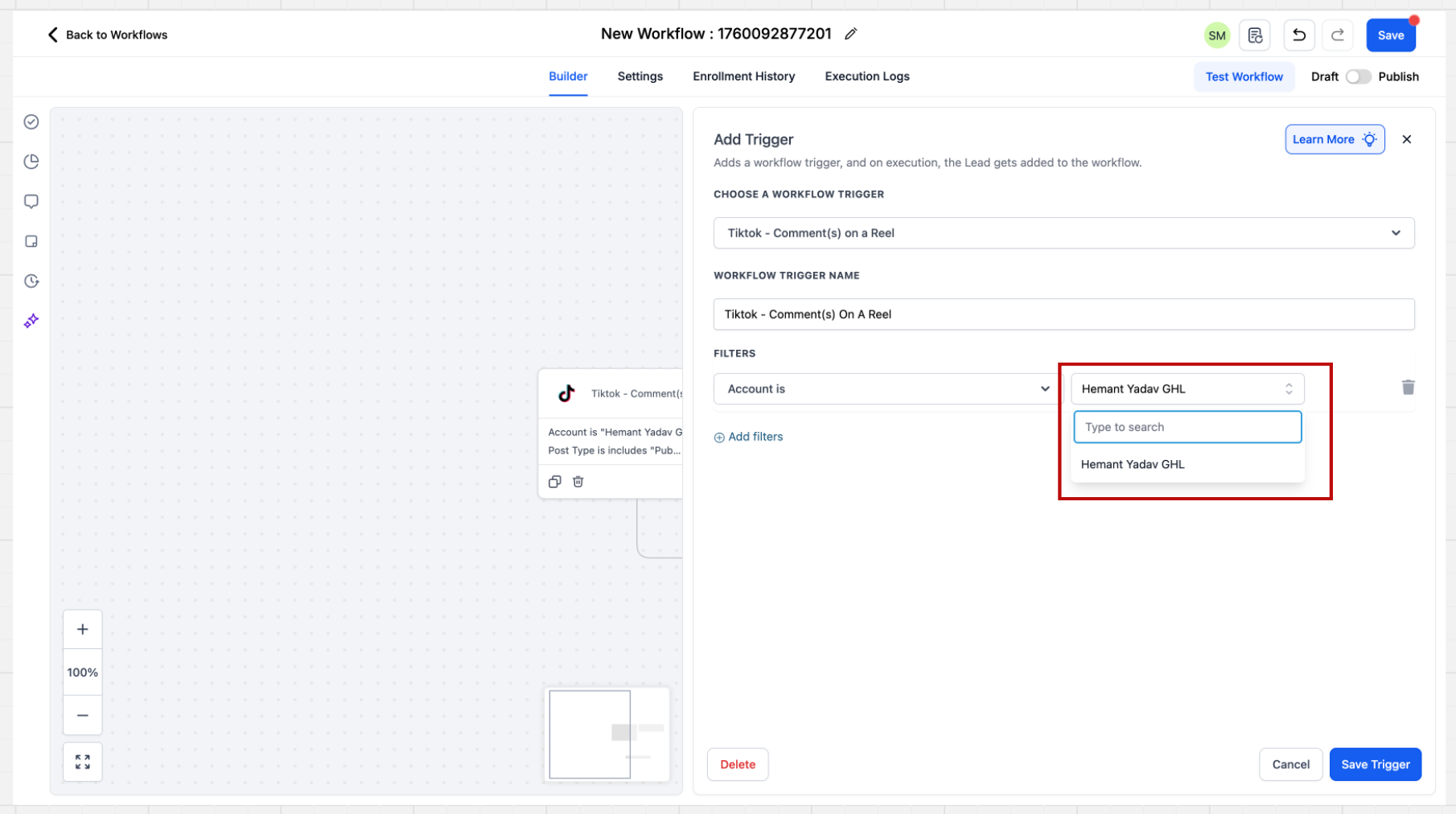
Step 2: Select Account
After clicking on the trigger, the sidebar will open with multiple filters. The first filter is the Account filter — select the TikTok account you want to monitor. If a specific account is not selected, the system will automatically consider all connected accounts.
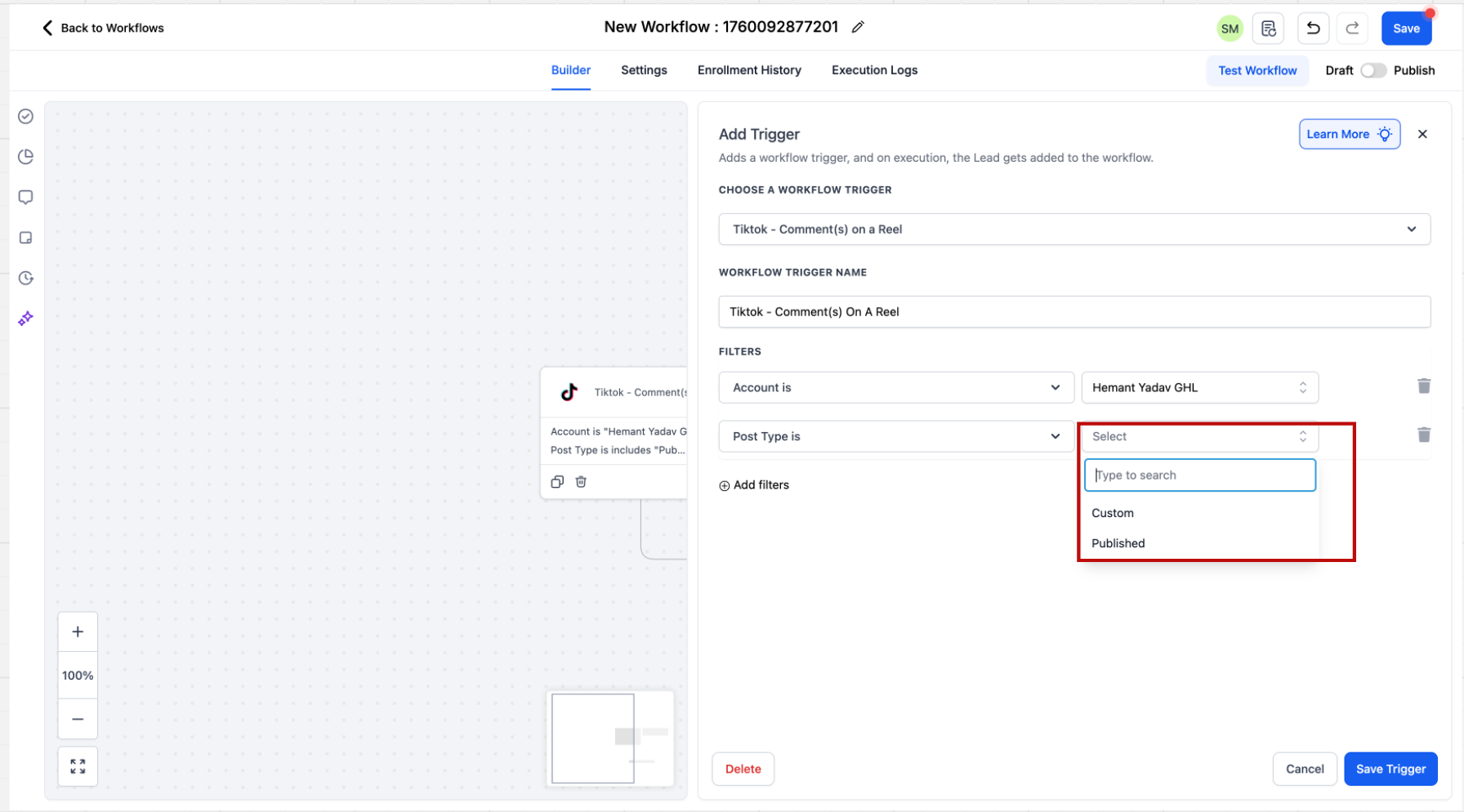
Step 3: Select Post Type
After selecting the account, choose the Post Type: Published or Custom.
- Published Post: Fetches all posts on your business page — all existing posts will be listed for selection.
- Custom Post: Allows you to define the post you want to monitor by providing a URL.
Post Selection Behavior: If a specific post is not selected, the system will automatically include all posts associated with the account.
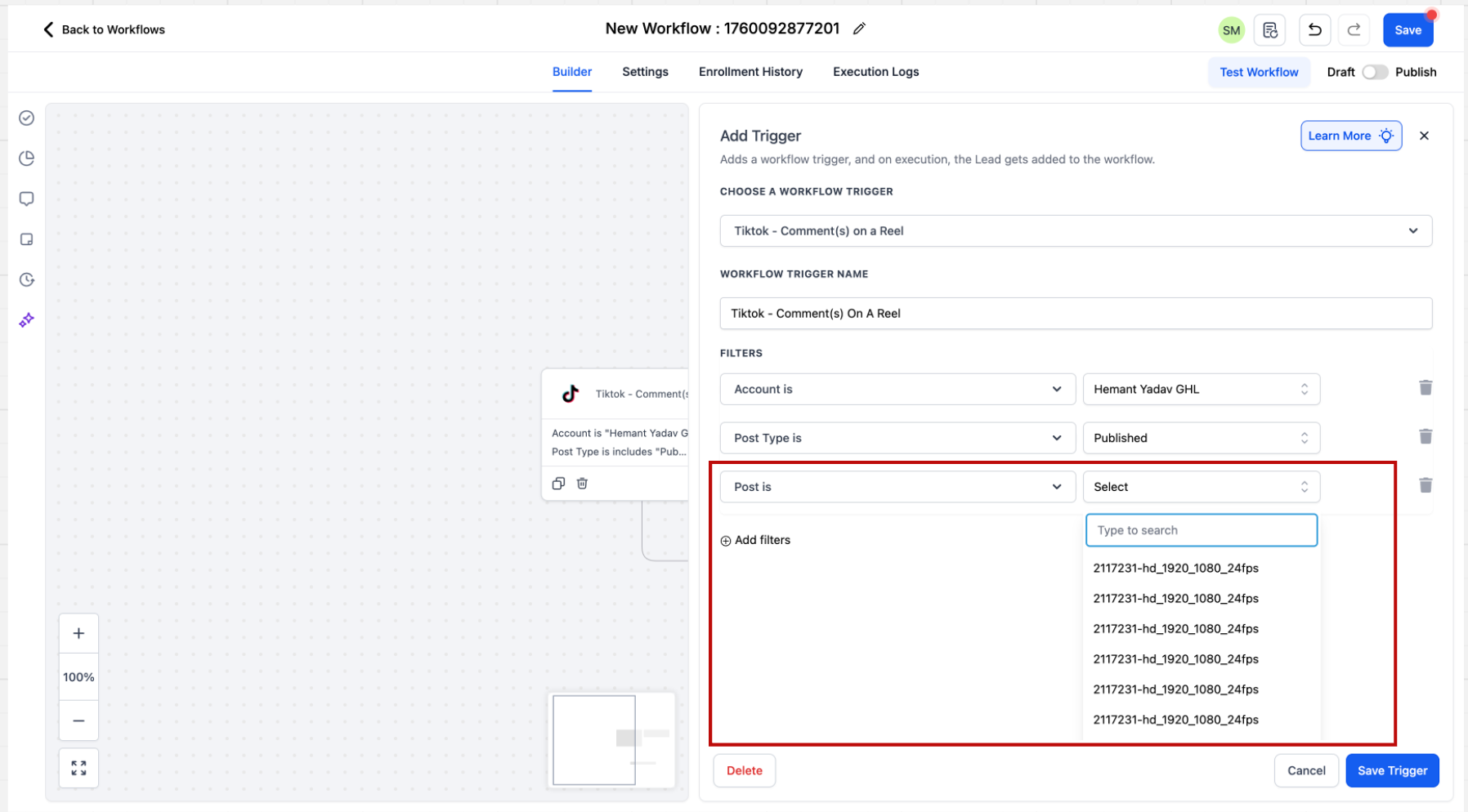
Step 4: Select Post or URL
Select the post or provide the URL of the post you would like to run the automation on.
Step 5: Specify Match Phrase
After selecting the post, enter what you are looking for in the comment. You can use Exact Match or Contains Exact Phrase:
- Exact Match – "Price" → Inbound: "Price" → Pass
- Exact Match – "Share the Price" → Inbound: "Share the Price" → Pass
- Exact Match – "Share the Price" → Inbound: "Please share the Price" → Fail
- Contains Exact Phrase – "I bought from you" → Inbound: "I bought from you" → Pass
- Contains Exact Phrase – "I bought from you" → Inbound: "I bought from you yesterday" → Pass
- Contains Exact Phrase – "I bought from you" → Inbound: "I bought one from you" → Fail
When a contact comes through this trigger, they will be saved as a contact and their First Name and Last Name will be captured automatically.
How to Setup Action: Reply in Comments
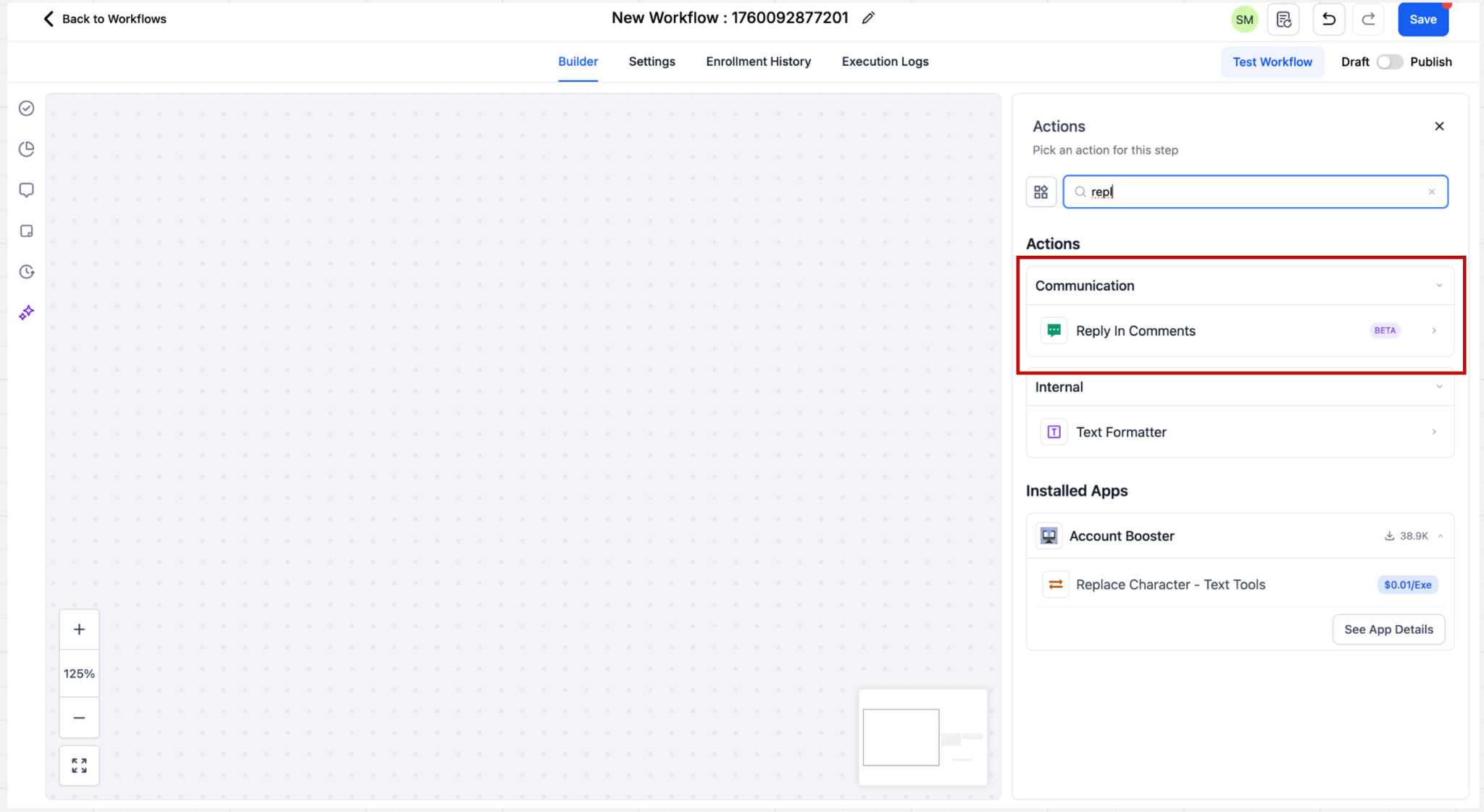
Step 1: Go to Actions
Add the "Reply in Comments" action to the workflow.
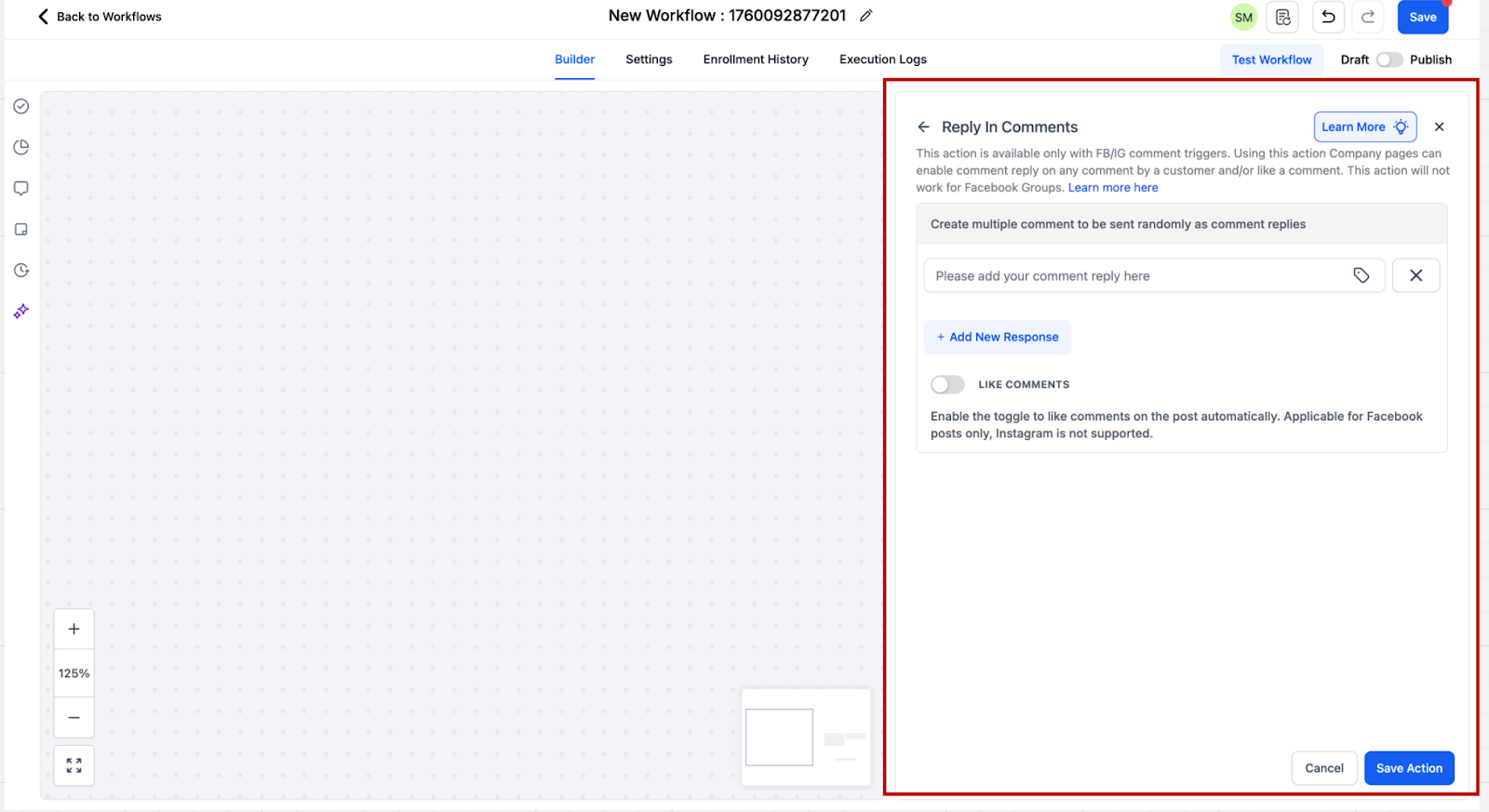
Step 2: Configure Reply Comments
You can configure up to 10 reply comments, which will be randomly selected during execution.
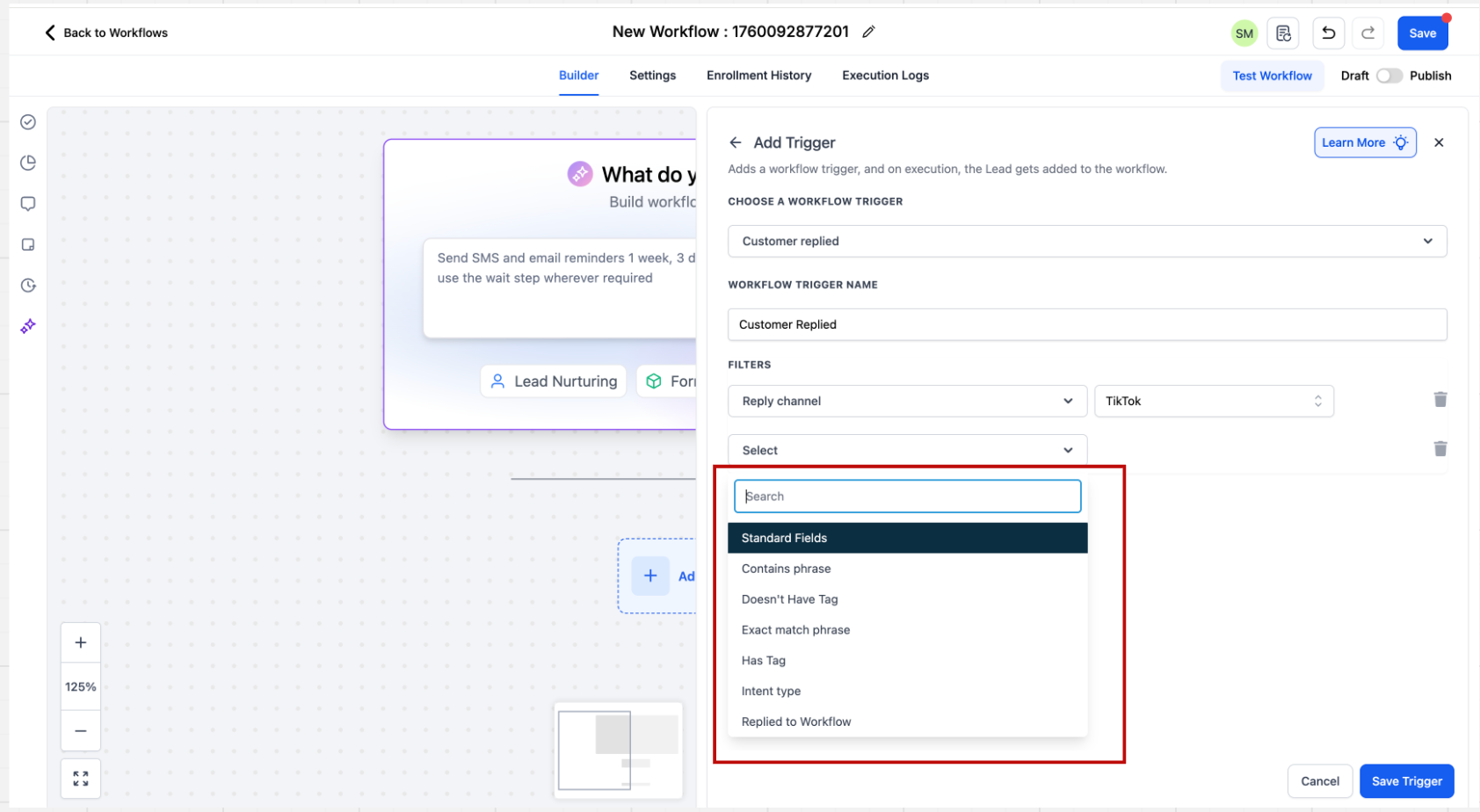
How to Set Up Trigger: Customer Replied
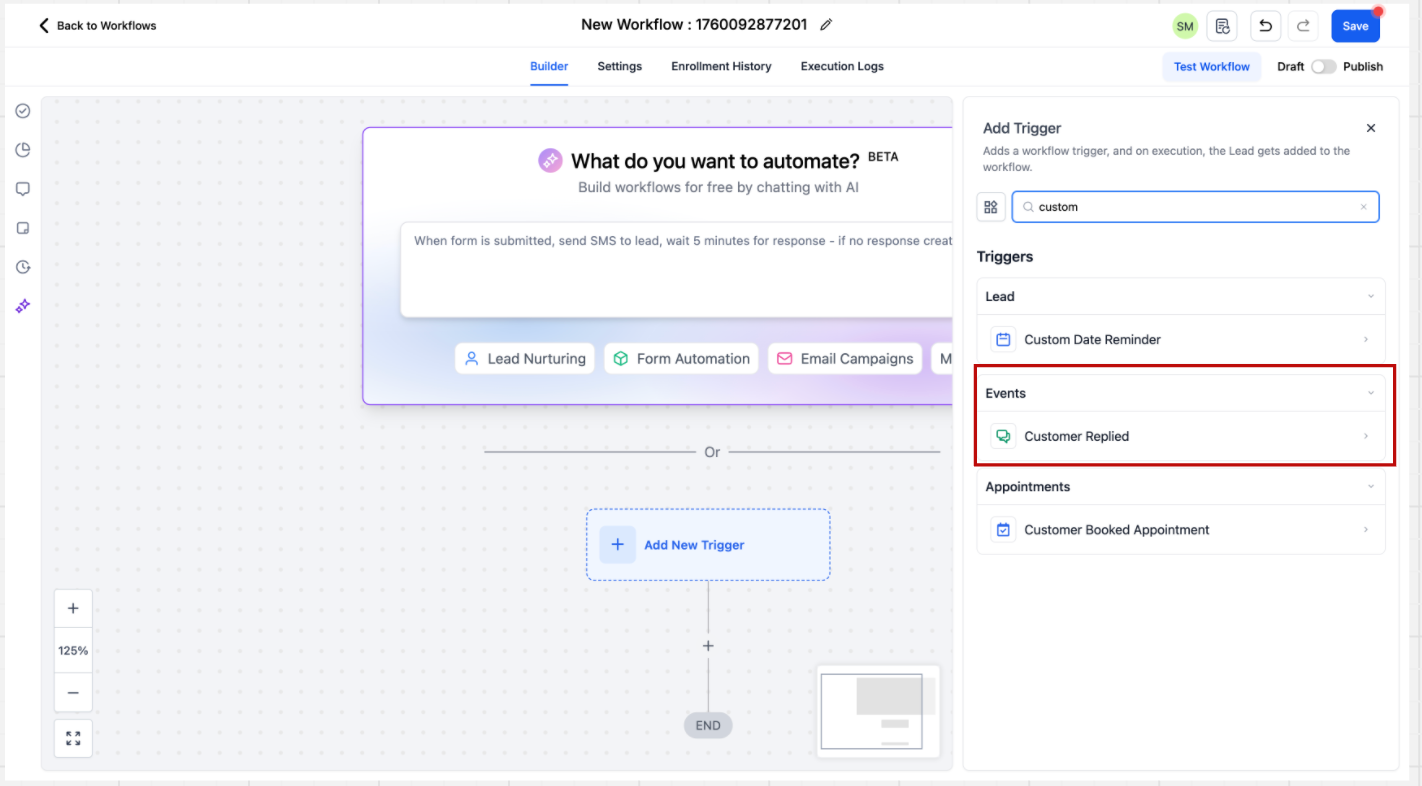
Step 1: Add Trigger
When creating a workflow, click on "Add Trigger". The trigger related to DM automation is "Customer Replied". Go to triggers and select Customer Replied from the available triggers.
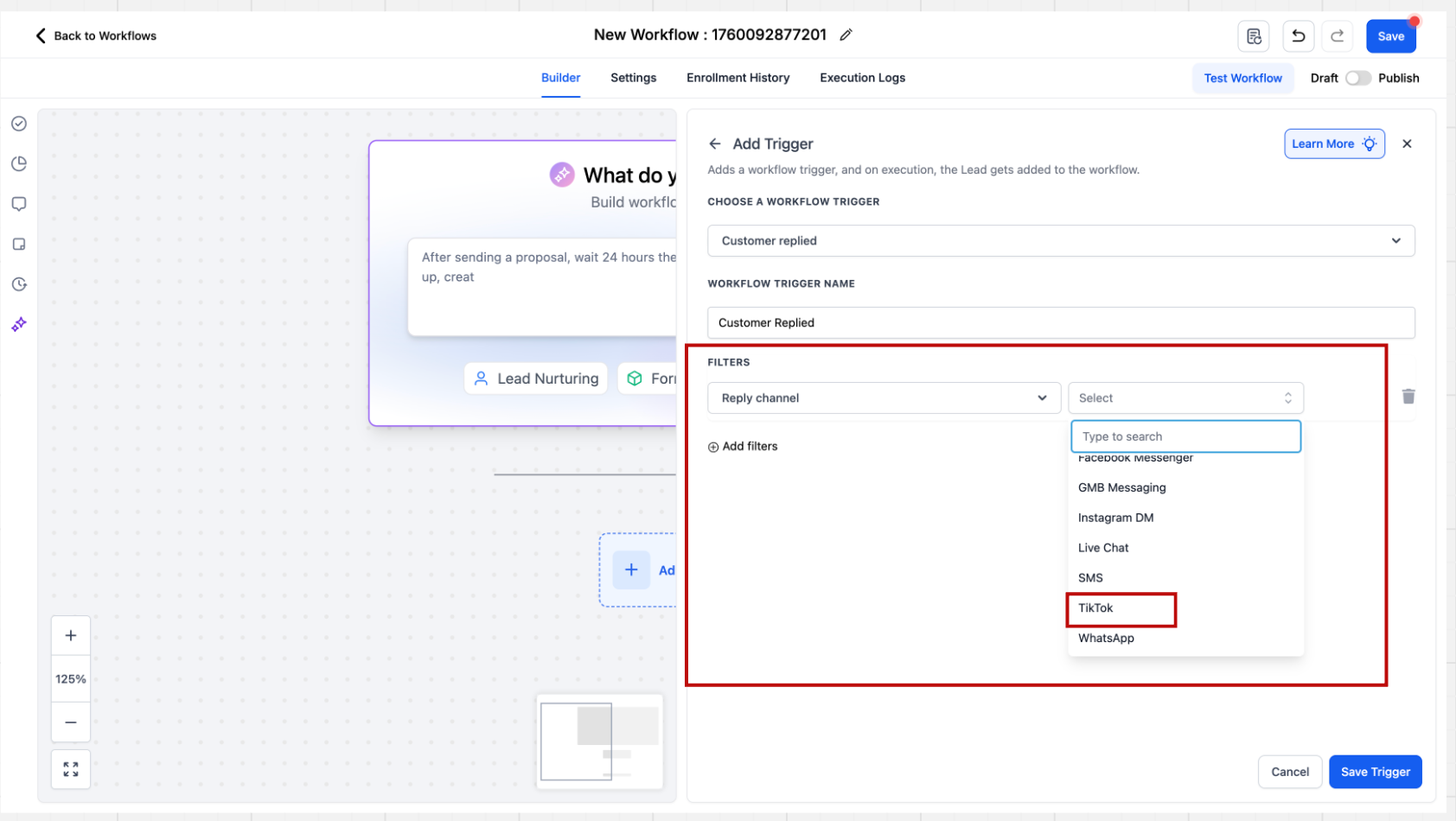
Step 2: Add Reply Channel
After clicking on the trigger, the sidebar will open with multiple filters. Select TikTok as the Reply Channel to scope this trigger to TikTok DMs only.
Step 3: Configure Automation Rules
Configure automation rules for direct messages by setting specific matching conditions, such as keyword filters, to control when the workflow fires.
How To Setup Action: TikTok Interactive Messenger
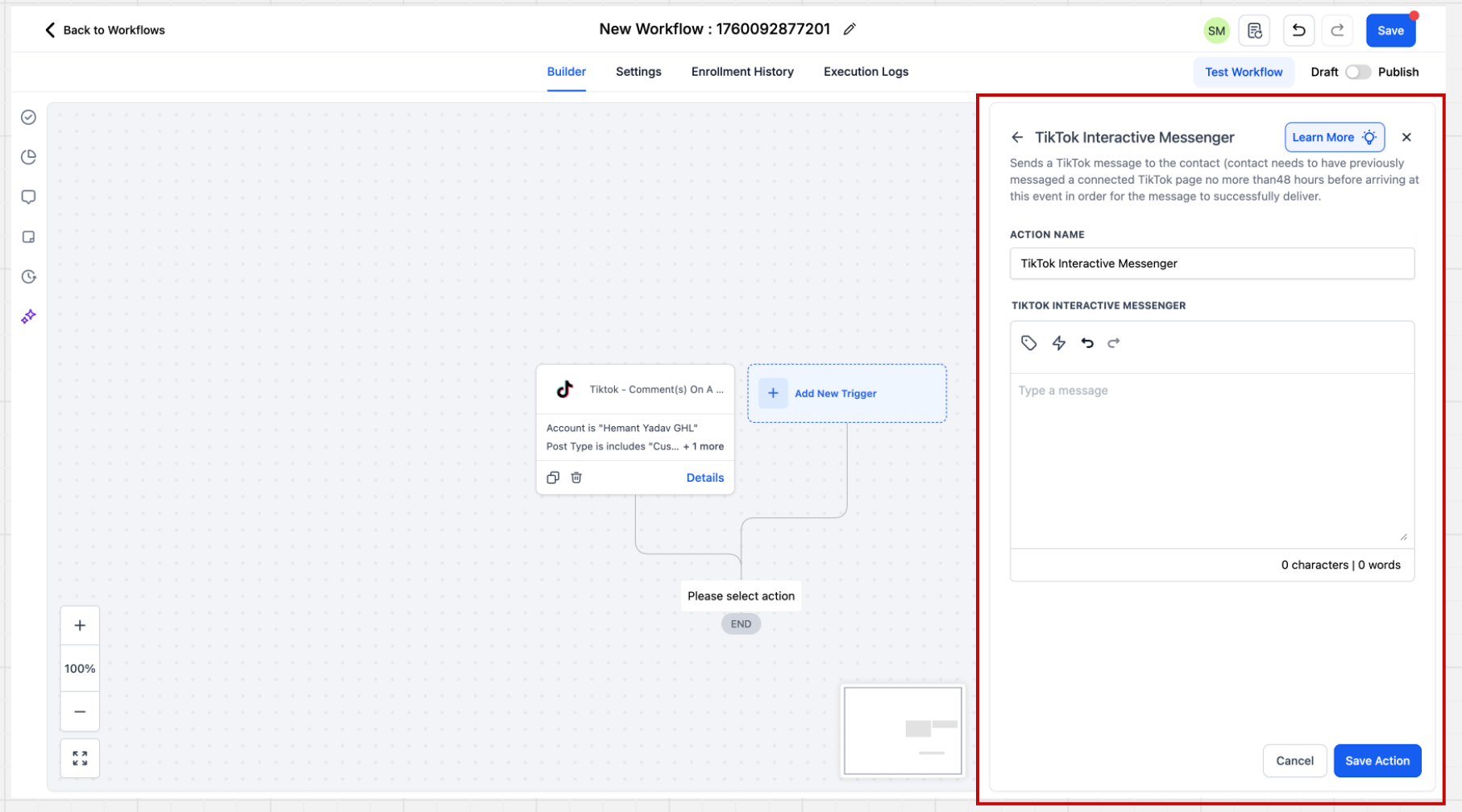
Step 1: Add Action
Within the Workflow builder, click + Add New Action. Select the TikTok Interactive Messenger action.
Step 2: Provide Message
Provide the message you want to send via TikTok DM. Please note the following limitations for TikTok Interactive Messenger compared to Facebook & Instagram:
- Does not support a "Reply Type" field — only direct messages are sent.
- Does not support Templates (this will be enabled in a future update).
- Does not support Attachments, Buttons, or Quick Replies (these will be enabled in a future update).
Frequently Asked Questions
Q: How many reply variations can I add in the Reply in Comments action?
Up to ten replies, used in a randomized order.
Q: Can I scope automations to a specific post?
Yes. Use the TikTok – Comment(s) On A Reel trigger and select the specific video/post you want to monitor.
Q: Can multiple TikTok accounts be connected?
Yes. You can authorize the account(s) you intend to use at the sub-account level. Scope triggers and filters to target the right account per workflow.
Comments
0 comments
Please sign in to leave a comment.