
Error and Opt-out Rate Monitoring
We are committed to helping our customers send trusted communications through Captivation Hub. To reduce the risk of carriers blocking messages or permanently suspending an account due to poor sending practices, we actively monitor overall messaging performance and take proactive steps to help keep delivery rates healthy.
The following actions may be taken when an account reaches certain thresholds:
Violation Email: We will send an email notification when a sub-account reaches an error rate of 6% or an opt out rate of 2%.
Temporary Account Restriction: We will send a suspension notice when a sub-account reaches an error rate of 10% or an opt out rate of 3%.
What should we do when we get a violation email?
Please stop all workflows, campaigns, triggers, and any other bulk actions that send messages to contacts who have not explicitly opted in to receive communications from the sub-account.
Please also enable and customize your opt out language and sender identification based on your use case so that future messages are less likely to be flagged.
What are error and opt-out rates and good to have a threshold?
A high opt out rate means that a higher than acceptable number of contacts are objecting to your messages, submitting complaints, or marking your SMS as spam. A healthy opt out rate typically falls between 0% and 1%. If the opt out rate reaches 2%, the sub-account will be restricted from sending text messages for 24 hours.
A high delivery error rate means messages are being sent to contacts whose numbers may no longer be active, may be unreachable, or may belong to a device that cannot receive SMS, such as a landline. It can also indicate that external carrier filters are blocking delivery due to poor sending behavior associated with the account in the past. A healthy error rate typically falls between 0% and 6%. If the error rate reaches 10%, the sub-account will be restricted from sending text messages for 24 hours.
What do I do to get the sub-account suspension removed early?
- The account suspension will be lifted in 24 hours. However, If the sub-account is permanently suspended.
How to prevent future SMS suspension
The account should be able to send SMS after 00:01 AM UTC the next day after you received the non-compliant email. You can check the best practices below on how to reduce the error rate:
1. Add Opt Out language (reply STOP/ Cancel to unsubscribe) in all the first SMS sent to a new contact -
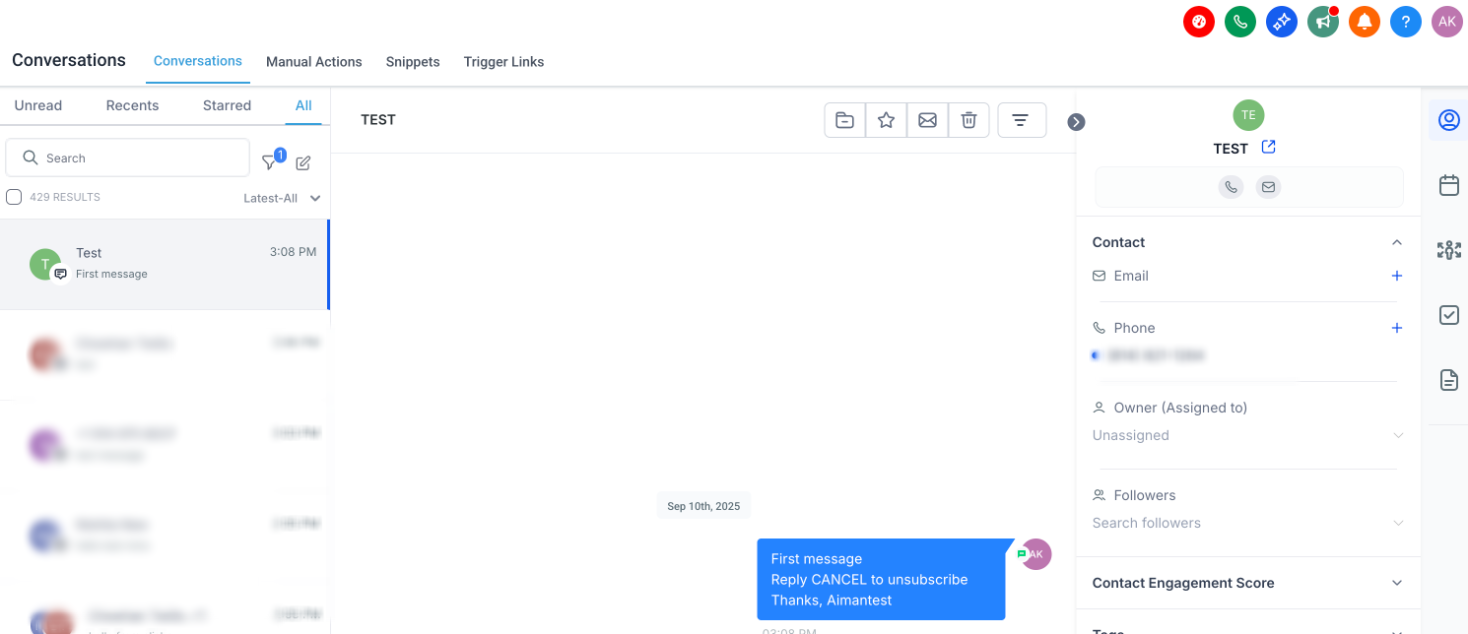
2. Add Sender information (Introduction of yourself/company) in all the first SMS sent to a new contact-
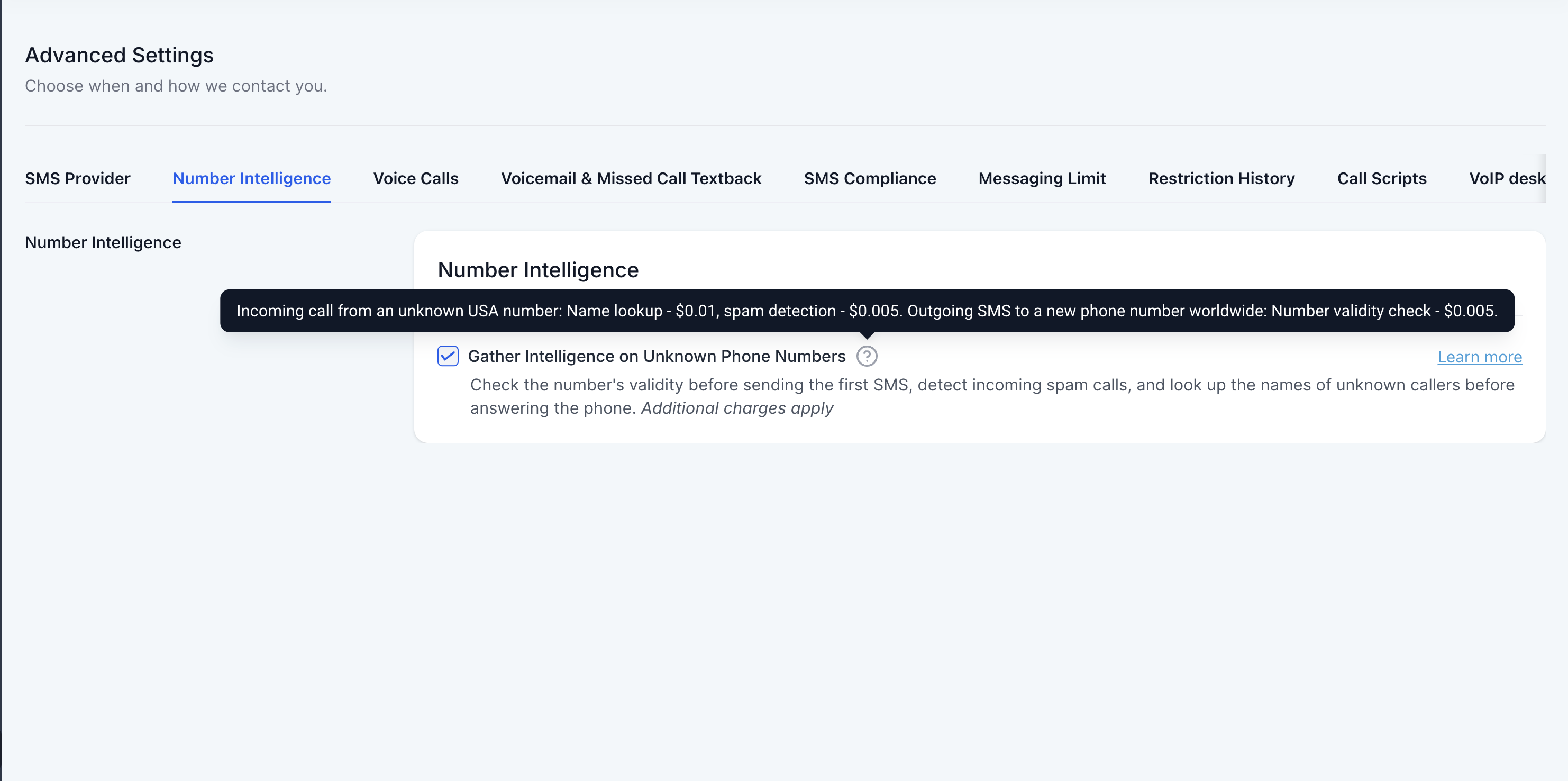
3. Do not send messages to SMS-incapable devices like landlines, Enable the Number intelligence for this. This feature will look up the number before sending out the message and enable and temporary DND on the contact.
4. Avoid sending URLs shortened using a public URL shortener
Using public URL shorteners such as bit.ly or tinyurl.com can negatively affect SMS deliverability. Carriers, especially T-Mobile and AT&T, often treat these links as higher risk because they are commonly associated with spam and phishing.
T-Mobile prohibits URL cycling and the use of multiple redirects. Messages using these practices may be blocked.
AT&T blocks public URL shorteners altogether.
Best practices:
Use custom or branded short URLs connected to your business domain.
Limit redirects to no more than one, and avoid masking the final destination of the link.
When possible, include the full URL to increase transparency, even if it uses more characters.
Improving your link practices can help reduce filtering and improve the chances of your messages being delivered.
- Make sure the Business Profile, A2P brand, and campaign are registered:
As messaging regulations continue to tighten, these registrations are becoming increasingly important. In many cases, messages will not be delivered unless the proper registrations are in place. If the sub-account country is set to the United States, you can review this information in the Trust Center tab.
If the country is not set to US, you can still use the system following the best practices so that the delivery rate is high and the SMS is not flagged. A2P campaign is just a more enhanced safety net for delivery but that doesn't mean you cannot use the system without it.
6. For future website form opt-in setup, please include a checkbox to ensure the lead gives consent when filling out the form if that's where the leads opt-in.
Below are examples of Web form Opt-In flow.
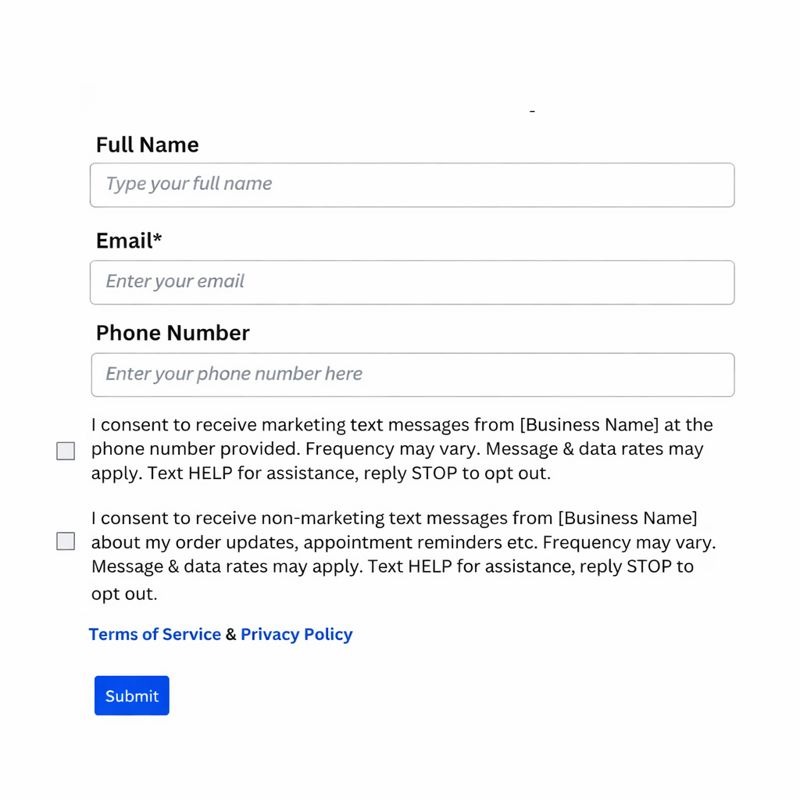
When Phone Number field is Mandatory in Web form OPT-IN.
- Consent checkboxes should be separated for both Marketing and Non-Marketing Messages.
- Consent checkboxes cannot be pre-selected and should be optional at all times
- Privacy Policy and TnC at footer.
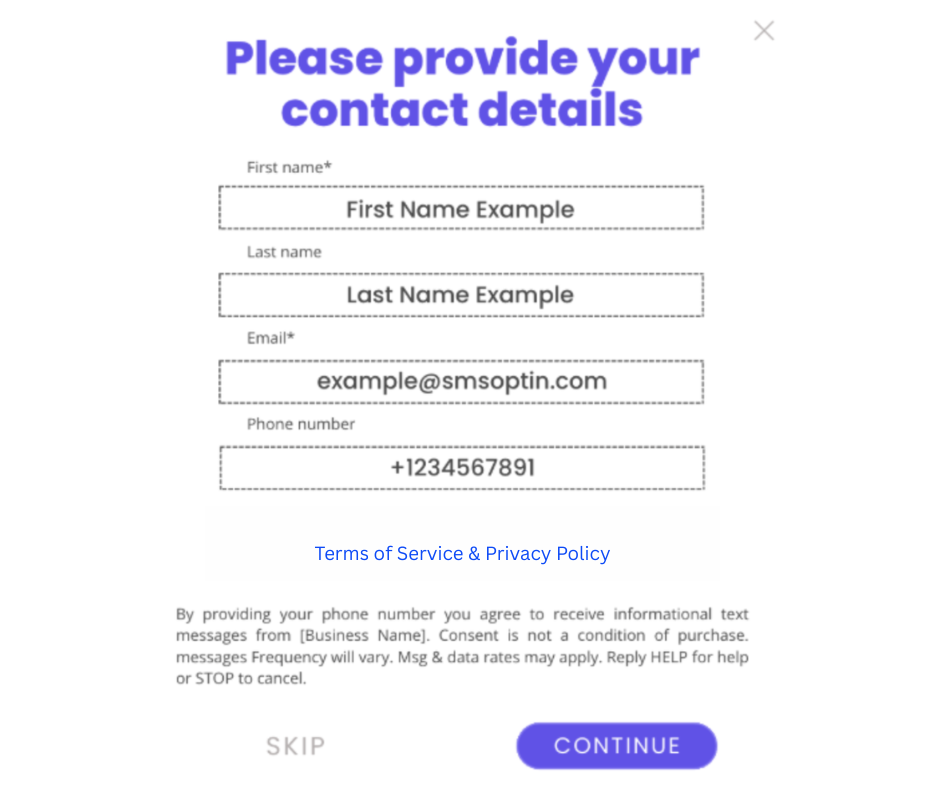
When Phone Number field not Mandatory in Web form OPT-IN. - Consent checkbox not required when Phone Number field is not mandatory.
- Privacy Policy and TnC at footer.
7. Good to Have: The first message should have the source of how your leads opt in.

8. Good to Have: Add Opt-in language so contacts are actively double opt-in via sms and web form checkbox (reply 1 to subscribe)
Comments
0 comments
Article is closed for comments.